
Now Available: Order Our Most Popular Products Online at Our Best Prices, On Your Schedule @ xPress.ink


Designing In Canva?
Please follow this guide when exporting your file to ensure your file meets our guidelines.
Acceptable File Types
In general, we prefer files to be delivered to us as PDFs with 1/8″ bleed on each side (more information on bleeds follows). We can also accept documents in Illustrator (with fonts outlined), or InDesign (packaged) formats.
We strongly advise against sending documents in the following formats: Microsoft Word, Microsoft Powerpoint, Microsoft Publisher.
Trims, Bleeds, and Margins
The Trim
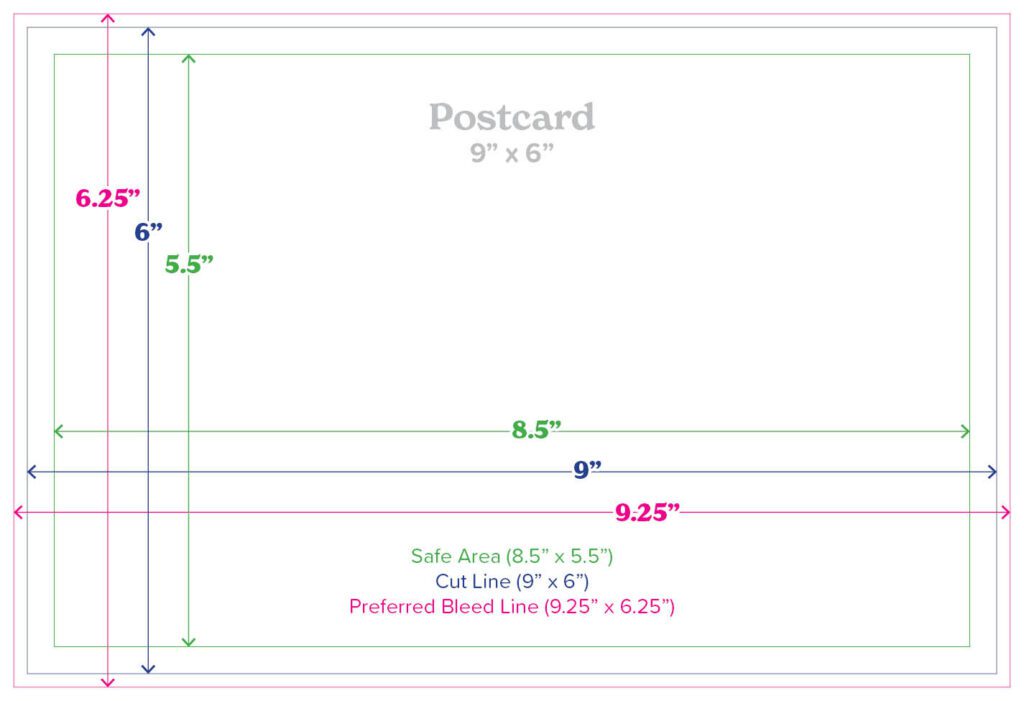
The trim is the final cut line of the document.
What is a Bleed?
A document that ‘bleeds’ is one that has artwork (including background colors or photos) that touch the edge of the page. Documents that bleed are printed on oversize sheets, and then trimmed down to the final size.
Adding an 1/8″ extra (known as the bleed) to each side allows us to trim to the final size of the document without leaving a white margin.
Margins
For most flat documents (postcards, business cards, etc.), we need a 1/4″ “safe area” around the edge of the trim line, which we call a margin. There should be no important text and/or images in this area. This ensures that if there are any registration variances, no important content will be cut off.
Any finishing/bindery processes being applied to the product should also be considered when determining margins – please call us for help if you are not sure.
A Note About Borders
Using borders close to the trim in your artwork can compromise the intended look of your product. When using borders, we recommend a margin of at least 1/2″, again due to the registration variances of printing.
A Working Example
Below is a diagram that shows a 9″ x 6″ postcard set up with the proper bleeds and margins.
Color Formats
Please ensure all artwork is provided in CMYK format. Files provided in RGB format will be converted into CMYK before print and may result in significant color differences from what you see on your monitor.

